Leaderboards reimagined — gamerpic rows, XCT Core gems and a cleaner look
The leaderboards just got a big visual refresh — and a few new boards to climb.
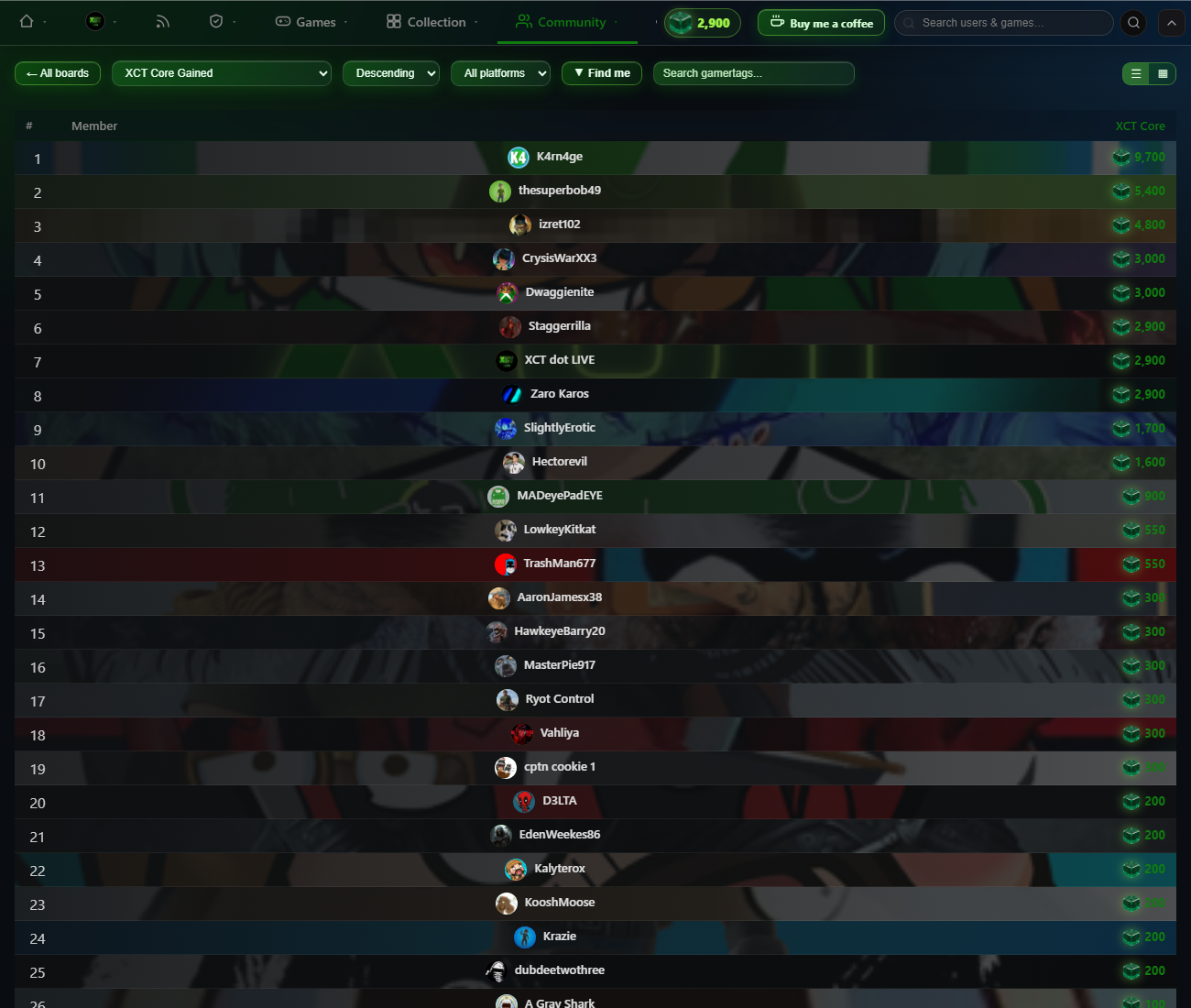
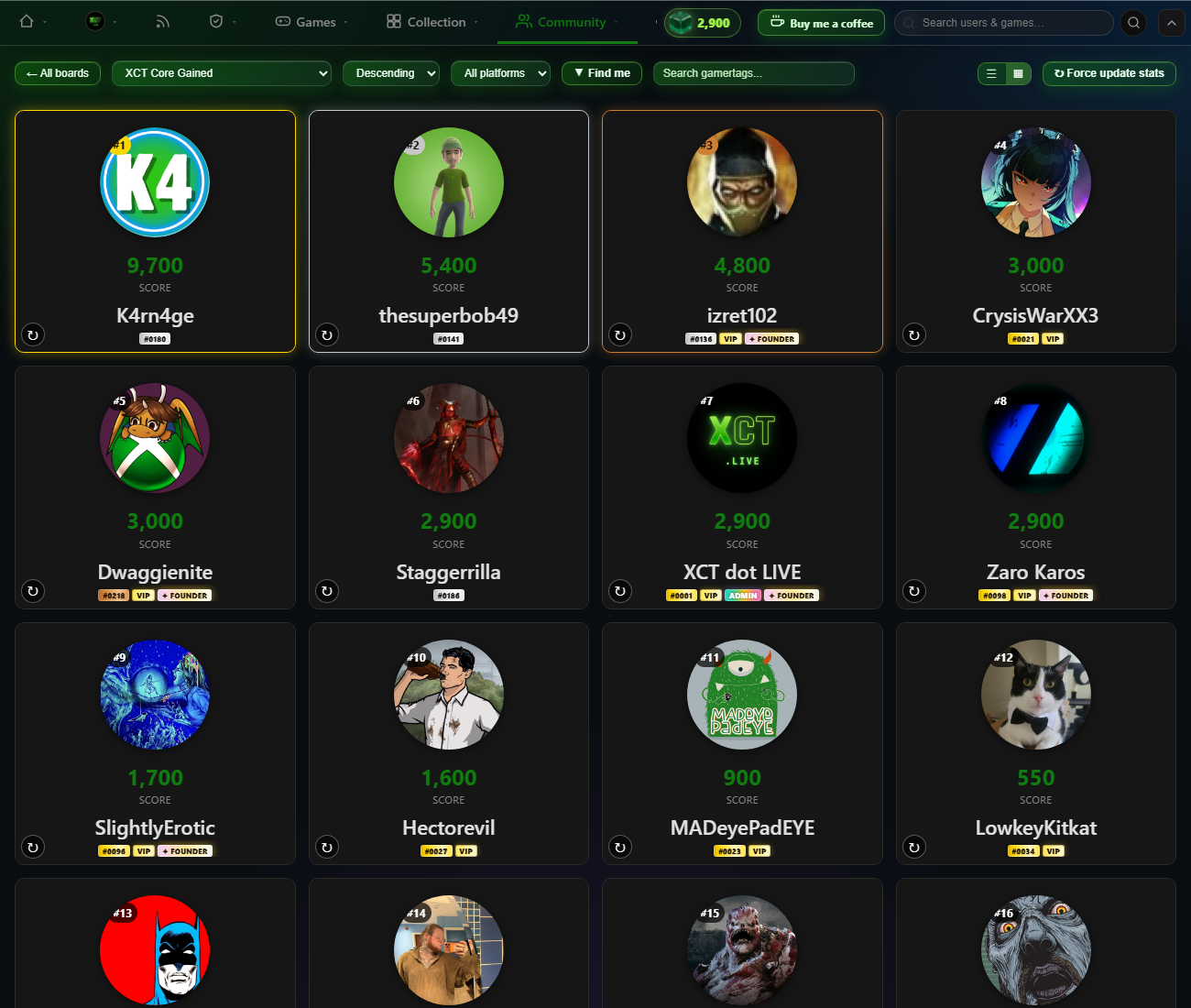
A fresh look on every board Each member's row now wears their gamerpic as a soft, blown-up background, so the board feels personal at a glance. Names are pulled into the centre, ranks are clean plain numbers, and the old clutter — medals, VIP/Founder/Admin badges and xbox.com links — is gone. A floating XCT Core gem now sits beside every score, and the whole top toolbar is finished in our signature green liquid glass.
Card view, the XCT way Switch to the grid view and every member becomes an XCT-style card — a smaller round gamerpic up top with a big, bold gamertag below.
New boards to climb Three new contributor boards sit at the top — XCT Core, Referrals and Cards — and the tenure and contributor boards now include every registered member. Open the leaderboards to find your row.
Also new this week • Feed Rewind rebuilds your achievements, gamerscore, games started and purchases over any date range as real feed cards — save the whole recap as an image. • Cleaner share cards export a dedicated layout with big poster art and your stats beside it. • A feed settings cog lets you toggle card types and switch on a compact mode, and you can now disable likes/comments on your own cards. • Streak timezone is now its own setting, separate from your display timezone.
Two big new features land today: Referrals and XCT Core. Invite your friends, collect a deck of reward cards, and start banking XCT — our brand-new currency.
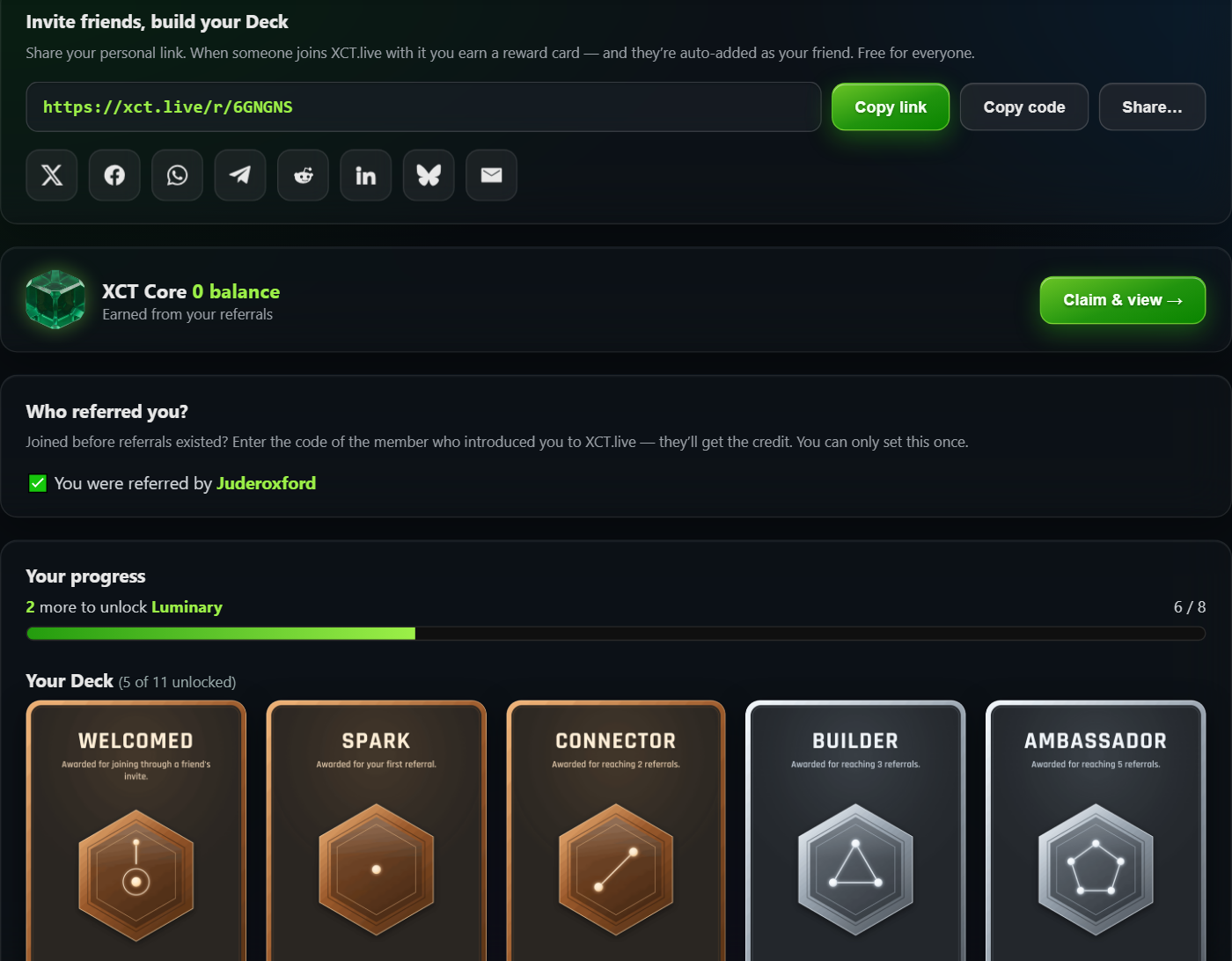
Referrals & your Deck Every member now has a personal invite link (and a short code) under Community → Referrals. Share it to X, Bluesky, Facebook, WhatsApp, Telegram, Reddit, LinkedIn or email — and when a friend joins with it, they’re automatically added as your XCT friend.
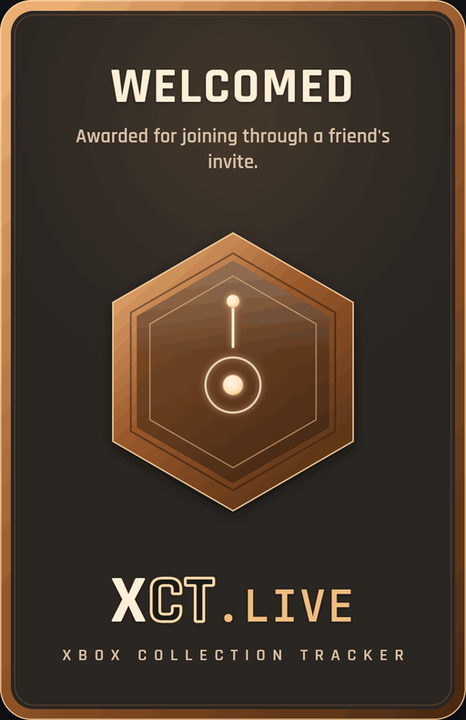
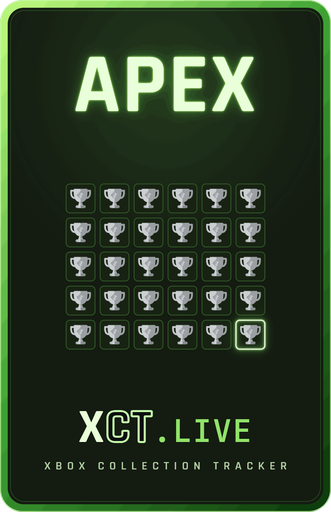
As your referrals add up you unlock a Deck of 11 collectible reward cards — from Welcomed (for joining through a friend) and Spark (your first referral) all the way up to Visionary at 100 referrals. Locked cards sit greyscale; unlocked ones light up in full colour, with a progress bar counting down to your next tier. Click any card to view it full-screen.
Joined before referrals existed? No problem — there’s a “Who referred you?” box to credit the member who introduced you (one-time), and your unlocked cards show off on your public profile under the new Deck tab.
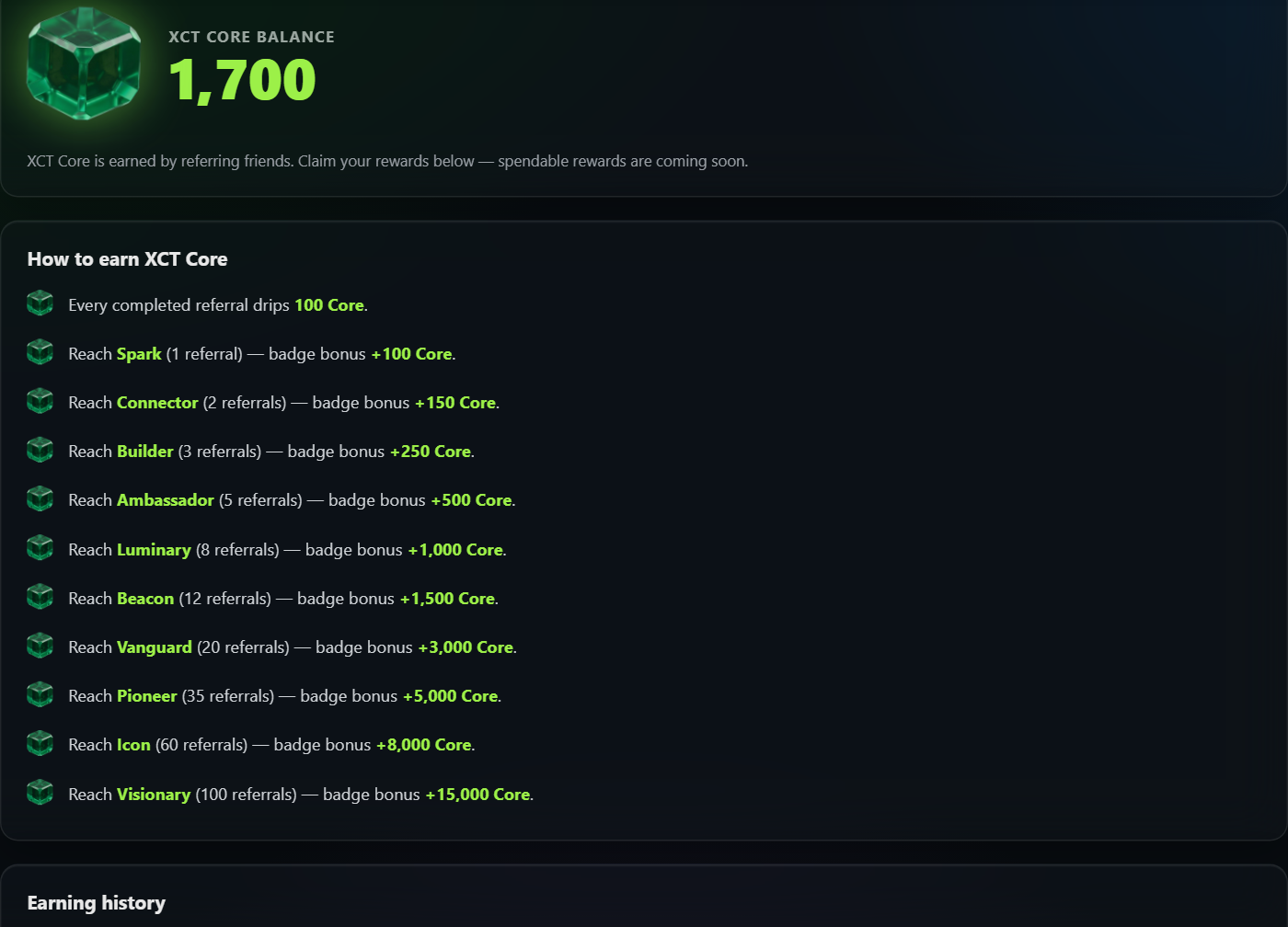
XCT Core — a brand-new currency Referrals now pay out in XCT Core. You earn 100 Core for every completed referral, plus a one-time badge bonus each time you reach a new card tier (+100 for Spark, scaling all the way to +15,000 for Visionary), and +100 for your Welcomed card. The floating gem in the top bar always shows your balance.
Open the XCT Core dashboard to claim your rewards — every reward has its own claim button, and claiming plays a little animation as the Core ticks up into your balance. You’ll find a full “how to earn” breakdown and your complete earning history there too.
What’s next? XCT Core is racking up right now so you’ve got a head start — spendable rewards are coming soon. Start sharing your link today and build that Deck.
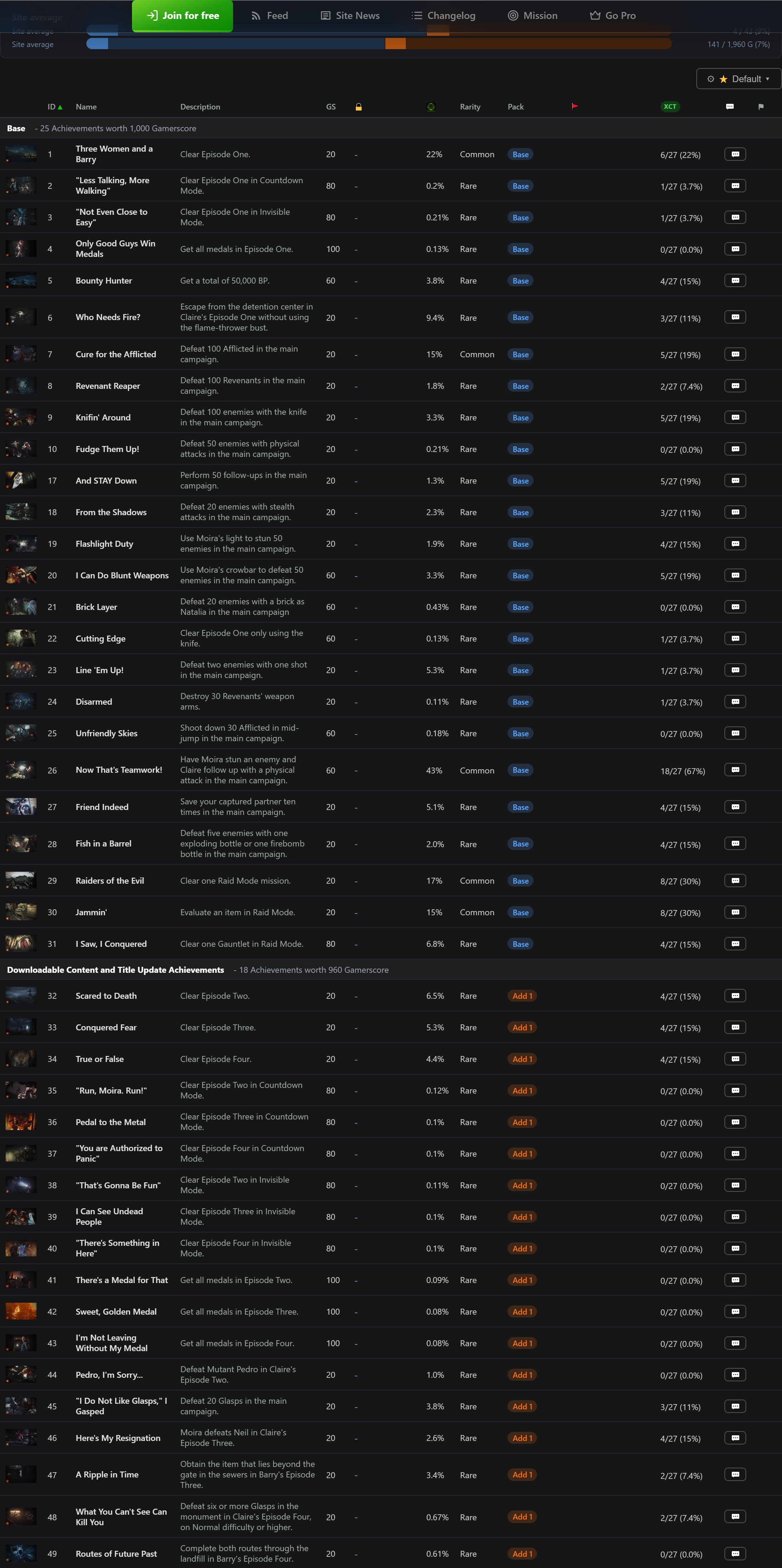
🏷️ Community pack tagging & colours — Tag every achievement to its DLC or Title Update pack (admin-moderated). The whole page is now colour-coded by pack: the progress bars split by pack, the pills match, and a new legend lists each pack’s gamerscore and achievement count.
⏱️ Unlock dates & times — See exactly when you unlocked each achievement, in your own timezone (e.g. “18:11 GMT”, milliseconds on hover), with a new date-format setting and a country flag on your profile.
⚑ Full flag set — A complete achievement flag taxonomy with emoji (Missable, Stackable, Online, Difficulty-specific and ~30 more), plus flag moderators.
🔎 Smarter search — Finds games whatever the word order (“batman lego 3” finds LEGO Batman 3), copes with ®/™ symbols, honours admin renames, and drops DLC and demos so you get the game you searched for.
🏆 A complete achievements directory — /achievements now lists every game that has achievements (~15,700, up from ~14,500), including ones whose list isn’t scraped yet.
🎆 Feed sparkle — A subtle firework on Pro / VIP / Founder / Admin upgrade and game-completion cards.
📱 Mobile & app — A new mobile menu and layout, an accessibility pass, and XCT is now an installable app (PWA).
➕ More DLC, automatically — A new scanner fills in DLC nobody owns straight from the Store, so add-ons show up in every game’s tag picker.
See the full list on the Changelog tab.
Share:
2026-06-13
What’s new: Art Manager, the Games feed, the Achievements directory & rarity
A big couple of days on XCT.live — here’s everything that landed.
🎨 Art Manager — Every game’s artwork (square icons and box-art) now comes from a single curated source of truth, so the right art shows up everywhere — your Collection, the Store, Achievements and your profile — instead of the odd random DLC thumbnail. There’s a full admin tool to review, replace, upload, paste or pull fresh art per title, a browsable gallery with zoom, and an automatic “broken art” scanner that flags rotted Microsoft image links so they can be fixed.
📰 Games feed — A new Community → Games feed tracks store and achievement activity across Xbox: brand-new games, DLC, editions and bundles, delistings, price changes, and newly-added achievement lists (including title-update achievements). Filter it by card type.
🏆 Achievements directory — /achievements is now a site-wide directory of every game we have an achievement list for — including hidden and pre-release titles other trackers don’t show. It carries the full Store filters and views, shows each game’s achievement count and total gamerscore, lists one row per unique game, and lets you expand any game to see its individual achievements.
✨ Achievement rarity — Every achievement now shows its global rarity % (how many players have unlocked it), both on your profile and across the directory.
👤 Profile refresh — A cleaner, more compact layout; your Recently Played / Completed rows now use the curated art; pick square icon or full portrait box-art (shown uncropped) and choose how many games each row shows. Plus a native Compare tab to line your achievements up against another gamer’s.
💬 Messaging — Friends and messaging are now open to everyone signed in with Xbox (no longer subscriber-only), and your sent friend requests now show in the Requests folder so you can cancel them.
Under the hood: faster page loads and a couple of stability fixes to keep the site snappy. 💚
Share:
2026-06-05
Microsoft fixes the Windows 8 Xbox sign-in bug — and XCT's Win8 Bridge helped get it there
For months, a wave of older Windows 8 / early-UWP Xbox games could no longer sign in to Xbox Live — breaking achievements across hundreds of titles. The cause: those games still used the deprecated XBL2.0 auth handshake that Microsoft's servers had stopped honouring.
We built the open-source XCT Win8 Bridge as a stop-gap: it sits between the game and Xbox Live and transparently swaps the legacy XBL2.0 token for a modern XBL3.0 one, restoring sign-in and achievement unlocks on affected titles (Reckless Racing was an early confirmed fix).
The problem — and the bridge — got picked up across the community: r/xbox, Pure Xbox (“might have solved how to fix hundreds of broken Windows games”).
Then came the best possible outcome: Microsoft fixed it at the source. An Xbox engineer confirmed that they’d pushed a server-side fix — “we pushed out a fix yesterday that we believe may fix the issues with Windows 8 sign-in and games unlocking achievements.”
That means many of those broken Windows games should now sign in and unlock achievements on their own — you may not even need the bridge anymore. It stays available for anything still affected, but the real win is the fix landing where it belongs: on Microsoft’s side. Huge thanks to everyone who tested, reported and shared. 💚
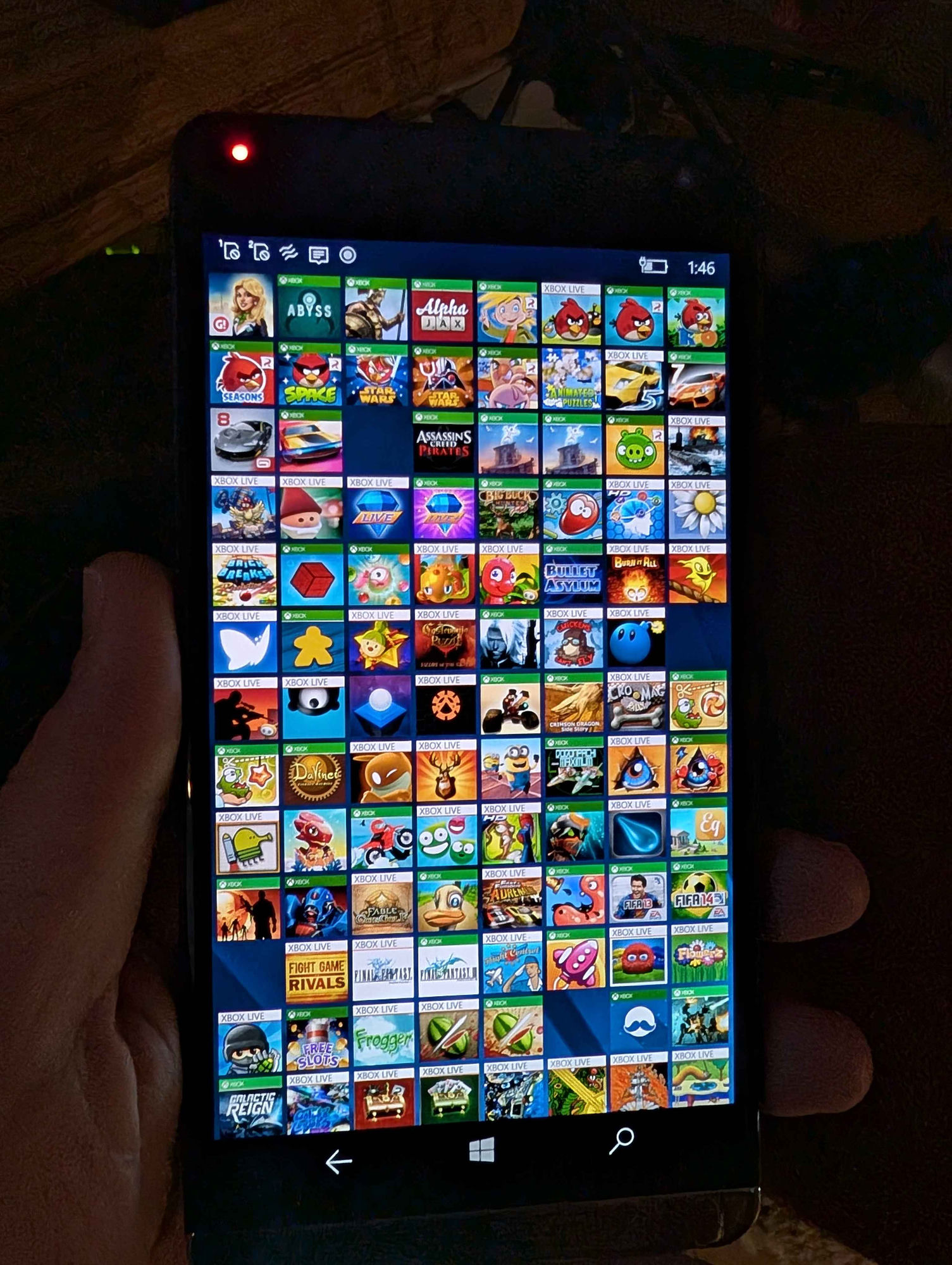
Next up: the Windows Phone devices are coming out of storage 👀
Share:
2026-05-16
Retro Xbox 360 gamercard on the Summary tab
Sign in with your Xbox account and the Summary tab now leads with a retro Xbox 360 style gamercard: gamertag in the yellow stripe, your profile picture, a Rep row built from your rarest equipped badges (tenure, gamerscore tier, then up to three Initiative badges), total lifetime gamerscore, your picked Zone, and a strip of the five games you've played most recently. Pick your Zone from the dropdown below the card — Recreation, Pro, Family, Underground, or Cheater.
Share:
2026-05-15
Tenure leaderboard
New built-in board ranks every tracked gamertag by years on Xbox Live, sourced from the profile tenure badge. The board auto-refreshes every November 15 (Xbox Live launch anniversary) so tenure year-counts roll over with Microsoft's clock.
Share:
2026-05-15
Leaderboards toolbar: switcher, filter, search + 5 new boards
Jump between any leaderboard from the toolbar dropdown, filter to All / Members / Xbox Employees / Rare Gamertags, live-search by gamertag, and use Find Me to page-jump to your own row. New boards: Games Played (with achievement), Total Gamerscore, Games Completed, Gamer by Achievements Won, Gamer by Completion %.
Share:
2026-05-15
Richer per-achievement detail
Achievement detail rows now show full millisecond-precision unlock timestamps, the rarity tier label (Rare / Common) alongside the percentage, a Secret chip on hidden achievements, in-progress progress bars ("73 / 100"), and a Challenge chip with the end date on time-limited seasonal achievements.
Share:
2026-05-08
Games Played leaderboard back on the index
The Games Played leaderboard is now a built-in card alongside Baby Games. Tracked gamertags are ranked by total titles played across Xbox 360, Xbox One, and Xbox Series, sourced via the Xbox API.
Share:
2026-05-08
Tracked gamertags now appear on custom leaderboards
Custom leaderboards can now show tracked (non-registered) gamertags alongside registered xct.live users — their per-game gamerscore is fetched once and cached, so any leaderboard whose game list overlaps their library will surface them automatically.
Share:
2026-05-08
Custom leaderboards now support editors
Leaderboard creators can grant edit access to other users via a user-search picker on the leaderboard detail page. Editors can add and remove games; only the owner can manage the editor roster or delete the leaderboard.
Share:
2026-05-08
Tile images for custom leaderboards
Pick a tile image for your leaderboard from any game it tracks. Card thumbnails now render at the image's natural aspect ratio — no more cropping.
Share:
2026-05-08
Leaderboards moved to the top ribbon
Leaderboards is now its own top-level tab right after Achievements, instead of being buried as a sub-view.
Share:
Loading industry news...
Queued — up next
Admin only. Claude's upcoming work, in order. Drag the arrows to reorder, edit the text, or delete anything you don't want — the order here drives what gets built next.
Loading…
Recent changes — verification
Admin only. Mark each shipped change Verified working, Verify & hide for confidential fixes, or Not working with a note — not-working items go back to the dev queue.
Loading…
Recently shipped & verified
Fixes and features confirmed live by the team.
Loading…
2026-06-28v3.3.10
Set main gamertag now syncs instantly — picking a new main in Manage Gamertags pushes it to xct.live straight away instead of waiting for your next scan, so the site reflects the change immediately
Share:
2026-06-28v3.3.9
GFWL Downloader fix — multi-part games (Viva Pinata, Resident Evil 5, etc.) no longer extract a full copy per .cab. Spanned cabinet sets are now extracted once into a single folder, so a 7 GB game takes ~7 GB instead of ballooning to ~100 GB
Share:
2026-06-24
Leaderboards reimagined — every board got a fresh look: your gamerpic now sits behind your whole row as a soft background, names are centred, ranks are plain numbers, and a floating XCT Core gem sits next to each score; the toolbar is green liquid glass and the grid view now reads like an XCT card (smaller round gamerpic, bigger gamertag). Plus three new contributor boards — XCT Core, Referrals and Cards
Feed Rewind — a personal recap that rebuilds your achievements, gamerscore, games started and purchases over any date range as real feed cards, with milestone moments; save the whole thing as an image
Better share cards — sharing a feed moment now exports a clean dedicated card (big poster art, your stats laid out beside it, XCT logo) instead of a screenshot
Feed your way — a settings cog lets you toggle which card types you see and switch on a compact mode (click to expand), there's an animated-emoji picker in DMs, and you can now disable likes/comments on your own cards and mute like-notifications
Streak timezone — your achievement-streak day boundary and your display timezone are now separate settings, so streaks line up correctly
Store sale columns — the store can now show sale start, sale end and days-left columns, and few-column views spread neatly across the row
Share:
2026-06-20
Achievement pages, reimagined — every achievement can be community-tagged to its DLC or Title Update pack (admin-moderated), and the whole page is now colour-coded by pack: the progress bars split by pack, the pills match, and a new legend lists each pack's gamerscore and achievement count
Unlock dates & times — unlocked achievements now show when you unlocked them in your own timezone (e.g. '18:11 GMT', milliseconds on hover), with a new date-format setting and a country flag on your profile; hover a stat to see who unlocked it
Full achievement flag set — a complete flag taxonomy with emoji (Missable, Stackable, Online, Difficulty-specific and ~30 more), plus a flag column, flag moderators and a 'Flags Confirmed' profile pill
Smarter DLC tag picker — sort DLC by name or install size, filter as you type, already-tagged packs float to the top in their colour, owned DLC are marked, and a price link opens the regional store; cosmetic add-ons can be marked 'non-achievement' to hide the clutter
Rename games & DLC (admin) — a pencil renames a game or DLC with a preset platform-suffix tick-list (W10 / X1 / SX / 360 / Switch / …) and a revertable record, so editions and achievement stacks read cleanly
Better search — finds games whatever the word order ('batman lego 3' finds LEGO Batman 3), copes with ®/™ symbols, honours your renames, shows games not DLC, and de-duplicates editions
Complete achievements directory — now lists every game that has achievements, including ones whose list hasn't been scraped yet (~15,700 games, up from ~14,500)
More DLC, automatically — a new scanner pulls each game's full add-on list straight from the Store, so DLC nobody owns still shows up; refreshed weekly
Community feed sparkle — a subtle firework on Pro / VIP / Founder / Admin upgrade and game-completion cards, plus shovelware 'new game' cards filtered out
Mobile & app — a hamburger side-menu, a mobile layout pass, an accessibility (WCAG AA) pass, and XCT is now an installable app (PWA) with an offline shell
Lots of polish — a consistent loading spinner everywhere, the footer always sits below the fold, tidier profile stat pills, and a pile of small fixes
Share:
2026-06-19
Customise the achievement table — every game page's achievement list now has a full table customiser: drag to reorder columns, tick columns on or off, filter Locked/Unlocked, set a default sort, and save named views that follow you across devices
Full game descriptions — game pages now pull in the complete store write-up (the short blurb sits in the banner, the full description at the bottom), and 60,000+ games were backfilled so it's there across the catalogue
Game pages polished — the regional price table is collapsible (collapsed by default), the gallery leads with screenshots instead of cover art, every column header has a hover tooltip explaining it, the page is slimmer and centred, and store links stack neatly
Cleaner achievement list — slimmer, left-aligned, content-width columns with full-line descriptions, the ID next to the icon, bare gamerscore numbers, and tidier Xbox % / XCT % columns (e.g. '7/7 (100%)')
Owned games show the Collection icon — game tiles, feed cards and profile pages now mark games you own with the Collection grid icon instead of a green tick
Edge-to-edge tile art — box art (Games for Windows, Xbox 360 boxes and the like) now fills its square tile instead of sitting inside a letterboxed frame
Store fix — 'Best Currency (grouped)' now groups correctly when you've set a custom gift-card price or Argentina conversion formula, so regions no longer scatter
Feed art fix — game art on achievement and completion cards no longer leaves gaps around odd-shaped covers; the rounded frame hugs the image
Share:
2026-06-24v3.3.8
Always up to date — Powertools now always checks for and applies the latest update on launch, so you never run a stale build. (The old '--no-update' opt-out has been removed.)
Create desktop shortcut — Powertools now has a one-click 'Create desktop shortcut' option right on the main menu (no need to set up a batch first). It drops a shortcut on your desktop that scans every signed-in gamertag and uploads to xct.live end-to-end with no menu and no prompts; pin it to the taskbar for a one-click recurring scan
Share:
2026-06-20v3.3.5
Game Installer: large installs no longer falsely time out — the per-package install timeout now scales with the package size instead of a fixed 15-minute cap, so big games (e.g. a 78 GB build) get the time they need to stage instead of being killed mid-install and reported as a timeout
Game Installer: 'Launch' after install now starts the right game — it reads the real app id from the installed package instead of assuming 'App', so games whose launch id differs (most of them) open correctly instead of just popping a File Explorer window
Share:
2026-06-20v3.3.4
Game Installer: out-of-disk-space installs now recover — Windows stages MSIXVC games onto your default app drive (usually C:), not the drive the download sits on, so a big install could fail with 'not enough disk space' even with room elsewhere. The installer now checks free space up front and, if the default drive can't fit the build, lets you pick another drive (registering it as an app-install location if needed); the same picker also appears as a recovery step if an install fails mid-stage. Large installs also no longer time out after 5 minutes
Share:
2026-06-20v3.3.3
Game Installer: install from a custom directory — alongside the existing 'Install from /downgrader_downloads' shortcut there's now an 'Install from a custom directory' option that opens a folder picker, so you can install already-downloaded packages from anywhere (point it at a parent folder of game folders, or straight at a single game folder)
Share:
2026-06-17v3.3.2
Game Installer: the Source column now tells you whether a version is in the CDN.json archive AND live on Microsoft's actual server — a '+ server' tag means the package URL is confirmed downloadable from Xbox's CDN right now (e.g. 'cdn_json + server' vs archive-only 'cdn_json')
Game Installer: skips the slow FE3 multi-ring scan when a modern endpoint already resolves a live package — faster discovery with no wasted round trips
Share:
2026-06-17v3.3.1
Game Installer: Xbox console builds no longer masquerade as PC — archived Xbox One/Series .xvc packages (which can share a title's ContentId with its PC build) now show their real platform (Xbox Series / Xbox One) and an 'xvc' format, so the PC (Desktop/msixvc) build is unmistakable when downloading
Share:
2026-06-15
Classic & delisted game pages — every Xbox 360, Games for Windows and Windows 8-era title now has its own game page, even ones long pulled from the store: its decoded Xbox 360 title ID, achievement list, and which XCT members own it
Xbox Live Arcade is now a platform — filter the Store, Games and Achievements by Xbox Live Arcade; every XBLA title also shows under Xbox 360
3D Slot Machine — a new profile game-picker: spin a 3D arcade cabinet to land on a random game from your collection (Genre → Year → Game)
Search from anywhere — a live search box in the top bar instantly finds members and games as you type, and game results jump straight to the full game page
Achievements directory — filter by Xbox 360 publisher code, decoded straight from the title ID, with a “Has decoded ID” / “No decoded ID” toggle and a multi-column dropdown; new columns show each title's product ID and its legacy/hex/decoded Xbox 360 ID
Members badges — the Members list gained a Badges column showing each member's VIP, PRO, Founder and Admin status
Companies tidied up — a studio that both develops and publishes now shows as one row with both DEV + PUB badges instead of two, and the total company count shows in the menu
Feed celebrates upgrades — going VIP, Pro or Founder now posts a card to the Community Feed
Game pages polished — key facts moved into the banner, artwork scales to fit (never cropped), developer/publisher names link out to their sites, the full owners list scrolls, and the achievement count is fixed (no more “2 of 73”)
More star ratings — Store ratings now fall back to a second catalog for delisted games, so far more titles show a rating
Profile polish — sub-pages open instantly with no home-screen flash, the tab strip stays put while switching, game tiles open the full page in a new tab, and grids fill complete rows at any width
Stats fix — the public profile's By-platform totals no longer double-count Play Anywhere games
Achievement flags — flag submitters get a thank-you message when their flag is confirmed, and admins get a faster batch confirm/deny queue
Support XCT — a green “Buy me a coffee” button now sits in the top bar, and the sign-in screen shows a live member tally with a claim-your-badge call to action
Share:
2026-06-11
Download HTML rebuilt — the offline copy of your collection (Collection ▸ Download HTML) is now an exact mirror of the live Collection and Purchases pages: the same sidebar filters, sorting, columns, de-duplication and totals, all working with no internet connection
Game pages — progress bars — every game page now shows your achievement and gamerscore progress against the site average, plus how many XCT players have started and completed the game
Game pages — tidier layout — a game's key facts moved up into the banner, achievement artwork now fills the row height, and your browser tab shows the game's name
Collection — the Achievements filter's “Achievements Earned” and “No Achievements Earned” options now work, matching against the achievements you've actually unlocked
Spot delisted games — the Store and Games filters now have a working Listing Status filter: show only games still on the store, ones that have been delisted (no longer purchasable anywhere), or hard-delisted (store page gone entirely). XCT scans every game in members' achievement lists daily to keep this current — 8,300+ delisted games flagged so far
Share:
2026-06-11
Friends feed — the Community Feed has a new Friends sub-tab showing activity from just your XCT friends; add friends from the Members tab
Full game pages — every game now has its own page (tap the ↗ next to any game name, or "Full page" in the details popup): all the facts, every region's price with a price-history chart, the full artwork gallery and trailer, bundle links, physical editions, community stats, and developer/publisher profiles with their socials
Game comments — talk about any game right on its page, with threaded replies and likes
Achievement flags — flag individual achievements as Unobtainable, Discontinued, Multiplayer, Online-required, Turbo OK, Time-limited or Glitchy; the community votes and confirmed flags show on the game's header
CDN build notes — every captured build of a game is listed on its page, and you can attach notes to each build (debug menus, version quirks)
Game assets gallery — a new Gallery sub-tab with every game's store artwork: cover art, banners, screenshots, logos and trailers, filterable by type and genre, plus a full-screen shuffle slideshow; the art is archived, so it stays viewable even after a game is delisted
1,600 mystery games identified — collection items that showed as “(unenriched)” now have their real names and artwork, including delisted, region-exclusive and long-dead store products
Activity heatmaps levelled up — the public profile's Activity tab gained a Gamerscore-per-day layer, day-by-day spending in purchase tooltips with per-year totals, and games you started but never unlocked anything in now count as started
Collection accuracy — games shared from someone else's console no longer count as owned, and Xbox 360 store purchases you've actually played are restored to your library; both fix themselves on your next scan
Feed is the new home page — xct.live now opens on the Community Feed when you're signed in, and site news + changelog updates appear there as cards
Ribbon menus — Home and Profile are now dropdown menus listing all their sub-sections, so every page is reachable in one click
Share:
2026-06-08
Compare achievements with friends — pick up to 3 XCT friends and see a side-by-side, per-game breakdown of gamerscore and progress, with a head-to-head banner showing who leads, a gap column for your easiest catch-ups, cover art, and a click-to-expand per-achievement diff that highlights exactly which achievements each friend has that you don't. Launch it from the Achievements tab, a friend's profile, or a shareable link
Team Coverage lens — flip the compare view to see, across your whole squad, which games everyone's done and which nobody has yet; toggle between “completed” and “played at all” and filter to Nobody done / Mixed / Everyone done / Only I haven't done to plan co-op nights and catch-ups
New Members tab — browse every XCT member with a linked Xbox account, sortable by gamerscore, games played, or member number, each with links to their Xbox and XCT profiles and an add-as-friend button
Store: new “On sale, Unowned, Sorted by price” saved filter, and the built-in XCT filters now sit in their own labelled section in the Saved Filters dropdown
Collection tab now sorts by Purchased (Newest first) by default
Achievements: the page header moved into the sidebar so the games table gets the full height of the screen
Profile pages got tabs — your public /u/ page now has a tab strip (Activity, Achievements, Games Played, Completed Games, About, Trophy, Stats) that switches instantly without a reload
Edit your profile in place — open your own profile and tap the ✎ Edit button to change your banner, bio, theme, accent colour, avatar shape & frame, social links, which sections show, your featured games and your trophy cabinet right where they appear, each saving on the spot (the old settings editor panel is gone)
Share:
2026-06-06
Store install sizes — every game now shows its approximate install size in the details panel, there's a new sortable “Size” column you can switch on in the Store list, and the filter summary shows a running total install size for whatever you're looking at
Leaderboards: filter by platform — a new platform dropdown (including Games for Windows Live) re-ranks every board by how many games each player has on that platform
Leaderboards now open on VIP Members by default, and VIP stats refresh automatically every day
Trophy Cabinet no longer stretches out of shape — the 3D cabinet keeps its correct proportions at any window size
News posts can be liked (anyone signed in) and shared in one tap to X, Bluesky, Reddit, Facebook, Telegram, or copied as a direct link
Sign in with Xbox on the Achievements tab to see your completed games.
Cabinet Style
Arcade: cylindrical display with rotation controls
CC-licensed chiptunes · Eric Skiff / Visager / Rolemusic / Juhani Junkala
Drag tiles to reorder. Use the Slot picker above to add, swap, or remove a game. Autofill replaces all 30 slots.
Game Pass Catalog
All
Not Owned
Owned
Recently Added
Most Popular
›
FiltersClear All‹
Sort By
Source
All Sources ▾
Clear All
Source Count
CDN Archive
Achievement Data
Type
All Types ▾
Clear All
Platform
All Platforms ▾
Clear All
Status
All Statuses ▾
Clear All
Release Year
Data Completeness
All Data ▾
Clear All
Loading…
›
FiltersClear All‹
Sort By
Type
All Types ▾
Platform
All Platforms ▾
Architecture
All Architecture ▾
XBOX Genres
All XBOX Genres ▾
XCT Genres
All XCT Genres ▾
XCT Tags
All XCT Tags ▾
Publisher
All Publishers ▾
Developer
All Developers ▾
Gamertag
All Gamertags ▾
Listing Status
All Listings ▾
Collection filters
Status
All Status ▾
Clear All
Scan batch
All Batches ▾
Ownership
Release Year
All Years ▾
Purchased Year
All Years ▾
SKU
All SKUs ▾
Owners
Achievements
DLC
CDN
Trial
My Lists
Lists ▾
Loading…
0 selected
Import your Xbox Store library
Pull every game and add-on you’ve bought from the Xbox Store straight from your sign-in — no Powertools or PC needed. Purchases are added to your collection as owned.
Hardware
Play History
Games from TitleHub not in your Collections (disc, trials, rentals, etc.)
Gamertag
Sort
Labs
Experimental achievement-tracking features, designed for XCT.
⚡ Preview — only you can see this. These features are hidden from the public and all other users until you sign them off.
Win Calendar
Every day you unlocked an achievement — the busier the day, the greener the square.
Your Rarest Unlocks
The achievements you own that the fewest players on Earth have — ranked by global unlock %.
The Calendar Project
Complete a game released in every month since the Xbox 360 launched (Nov 2005). Filled months show your completion; empty months suggest games you've started but not finished. Concept by eohjay.
Completion of the Day reward — Layout A
Real card + diffused Minecraft background as in production. The Apex card is the primary portrait on the right; the game art sits bottom-left.
The RealScore points curve across the entire games library — visualising the distribution and range of every game’s total RealScore.
⚡ Preview — only you can see this. Library-wide RealScore analytics, hidden from everyone else for now.
RealScore rewards rare-achievement skill over raw Gamerscore.
How is RealScore calculated? ▾
Each achievement earns a multiplier = √(100 ÷ its global Xbox unlock %), capped at ×100.
So an achievement only 1% of players have is worth ×10; a 10% one ×3.16; a 50% one ×1.41.
A game’s RealScore is the sum of Gamerscore × multiplier across every achievement in the game.
It uses Microsoft’s official whole-population unlock % — not a small tracked crowd — so genuinely hard achievements count for far more.
Read to two decimal places (down to 0.01%) for extra precision on ultra-rare achievements.
Achievements with no published unlock % count at face Gamerscore (×1).
Updated daily.
RealScore = Σa GSa × ma ma = min(100, √(100 / pa)) if pa is known, else 1 GSa = achievement a’s Gamerscore, pa = its global Xbox unlock % (2 dp)
Groups
Browse games by grouping — pick a group to open the Games list filtered to it.
Group type
Subscriptions
Game Pass, EA Play, Ubisoft+ and more — jump to each service’s games in the Store, its leaderboards, and what’s leaving soon.
View
Spend Summary
Your private purchase analytics — total spend and how it breaks down by year, platform and genre. Visible only to you, from your synced purchase history.
Loading your spend…
Achievements
Every achievement XCT tracks across all games — search and sort the whole database. Each links to its game.
Loading…
Achievement
Game
Genre
XCT Genre
Platform
Pack
Rarity
GS
RealScore
Owned
Sign in with Xbox to view your achievement progress across all games.
Games
Stats
›
FiltersClear All‹
Sort By
Type
All Types ▾
Platform
All Platforms ▾
XBOX Genres
All XBOX Genres ▾
XCT Genres
All XCT Genres ▾
XCT Tags
All XCT Tags ▾
Publisher
All Publishers ▾
Developer
All Developers ▾
Gamertag
All Gamertags ▾
Listing Status
All Listings ▾
Achievements
All Statuses ▾
Game
Gamerscore
Progress
Last Played
Loading…
Guides
Community achievement guides & game walkthroughs.
Roadmap
Ideas, bugs & changes for XCT — submitted by the community, built by us.
This board is how the community decides what XCT builds next. Submit it, rally the votes, and we ship it.
Submit anything — a feature idea, a bug, a suggestion or a change request.
Earn Core when your ticket ships — the reward lands once it’s implemented and live, first come, first served. Queuing or accepting a ticket awards nothing on its own; duplicates are marked dupe and earn nothing.
Write it to win — a clear title, the exact steps or a concrete example, screenshots and links. Sharp tickets ship faster.
Stay anonymous if you want — post anonymously (name hidden, you still earn Core) or hidden (only the XCT team sees it).
When your ticket ships, a reward lands for you to claim on the Core screen.
Core awarded per shipped & live ticket
bug
low 100medium 200high 300critical 500
idea200
suggestion100
change100
Top contributors — actioned tickets
Forum
Talk Xbox — collecting, achievements, tech help, trading and more.
XCTrade
Buy, sell and trade physical & digital copies with fellow collectors. List your copies from any game’s page.
Leaderboards
Public leaderboards comparing achievement progress across registered gamertags. Anyone can browse; signed-in users can create their own.
#
Gamertag
Gamerscore
Games
Completed
Games tracked
Editors
Editors can add and remove games on this leaderboard. Only the owner can add or remove editors.
Loading...
Loading…
|
Loading\u2026
Pick a conversation
›
Clear All‹
Saved Filters ▾
Sort By
Type
All Types ▾
Platform
All Platforms ▾
Architecture
All Architecture ▾
XBOX Genres
All XBOX Genres ▾
XCT Genres
All XCT Genres ▾
XCT Tags
All XCT Tags ▾
Publisher
All Publishers ▾
Developer
All Developers ▾
Gamertag
All Gamertags ▾
Listing Status
All Listings ▾
Legacy ID
All Legacy IDs ▾
Generation
All Generations ▾
Sale / Deal
Price
All Prices ▾
Channels
All Channels ▾
Subscriptions
All Subscriptions ▾
Features
All Features ▾
Metacritic
All Metacritic ▾
Completion time
Any completion time ▾
any completion time
Multiplayer
All Multiplayer ▾
Technical Features
All Tech Features ▾
Accessibility
All Accessibility ▾
Supported Language
All Languages ▾
Age Rating
All Ratings ▾
Handheld Compatibility
All Handheld ▾
Bundles
All Bundles ▾
Physical Disc
Region Availability
Turned off Has achievements — most region exclusives have none.
Release Status
All Release ▾
Release Year
All Years ▾
Ownership
All Ownership ▾
Exclusions
No Exclusions ▾
Add Game
Listings
Wishlist
Log
+ Editions+ DLC+ Bundles
Loading...
0 selected
Pick a case to see metadata
This wishlist is empty.
Open the Listings tab, enable Select mode, pick games, then choose Add to Wishlist ▾.
Subscriptions
Scan Log
Imports
›
FiltersClear All‹
Source
Status
All Statuses ▾
Market
All Markets ▾
Currency
All Currencies ▾
Price
Gift
Purchase Year
All Years ▾
Achievement Status
Achievement Status ▾
Sort By
Type
All Types ▾
Platform
All Platforms ▾
Architecture
All Architecture ▾
XBOX Genres
All XBOX Genres ▾
XCT Genres
All XCT Genres ▾
XCT Tags
All XCT Tags ▾
Publisher
All Publishers ▾
Developer
All Developers ▾
Gamertag
All Gamertags ▾
Listing Status
All Listings ▾
Games for Windows - LIVE
Platform ▾
Publisher ▾
Developer ▾
Source
Versions
Contributor
Content
Companies
Hardware
Loading…
Physicals
Xbox, Xbox 360, Xbox One & Xbox Series physical disc preservation catalog. Cover art & genre shown for discs cross-matched to the digital catalog.
FiltersClear All
Search
Sort
System
Region
Edition
Genre
Loading…
Overview
Users
Catalog
Achievements
CDN
System
Cron Summary
Overview
Dashboard
Activity
Feed
Users
Referrals
Core
Scan Farm
Tokens
Cheaters
Games DB
Game Pages
XCT Genres
Art Manager
Company Logos
Physical Discs
Metacritic
HowLongToBeat
Company Dedup
Invalid IDs
Legacy ID
Achievement Lists
Ach Packs
CDN.json
CDN Leaderboard
Tools
Permissions
Fuzz Scan
Cheaters — .000-millisecond unlocks
All Platforms ▾
Clear All
Achievements unlocked with a .000-millisecond online timestamp (no sub-second precision) — a tamper / offline-sync tell. Scans every platform with an achievement list by default; narrow it with the platform filter. Click a gamertag to expand their games, then a game to see the flagged achievements.
Growth Dashboard
XCT Genres — Moderation
Community-submitted XCT genre tags & proposed new genres await review here. Approving a tag also approves its proposed genre. Admin tags are auto-confirmed and never appear here. Tick rows to bulk-approve, or grant a member Auto-confirm (their tags go live instantly) / Moderator (can remove genre tags) in the leaderboard below.
Company Logos
Set a company\u2019s logo by URL or upload an image (same as game art). Logos feed the Companies grid & company hub pages. Sorted by game count. \u201CRun backfill scan\u201D auto-fetches missing logos from Wikidata.
Section Permissions
Toggle which sections each audience can access. Admin is always on (can't be locked out). Restrictions take full effect when the subscriber gate is enabled; opening a section to non-pro grants its data access immediately.
Loading…
Cron Jobs
Loading...
Company Dedup
Each card is one company after auto-normalization plus your manual merges/splits. Tick 2+ names and Merge to fold variants of the same studio together; Split off pulls a wrongly-grouped name into its own company; Rejoin / Unmerge all undo. Changes apply to the public Companies directory within ~5 minutes.
Loading\u2026
Community Feed Settings
Game art style
The big game art on achievement / completion cards. Changes apply on the fly — readers pick them up on their next feed refresh.
Achievement Packs
Auto-detected Base / Title Update / DLC packs. Edit a row to override (kind, pack #, label) and Save; Recompute re-derives the auto packs from unlock data.
Achievement Lists
Loading…
Game
TID
Platforms
Release
Achievements
Scanned
Marketplace Scans
Subscriptions
Update individual tier:
Achievements
Recent Scans
CDN Version Monitor
Purged Versions
CDN Storage & Purge Breakdown
Loading…
CDN Monitor Scans
XGD CDN Scraper
Loading...
Invalid Title IDs
Registered Users
Registered Users
\u21bb Auto-runs daily 04:00 UTC
Referral activity
Top referrers
Recent referrals
Core economy
By reward type
Top holders
Recent claims
All types ▾
Loading…
Powertools bundle
Links
Achievement Scan Farm
Gamertags
Proxies
Live log
Add proxy (host:port or full URL; SOCKS5 may need socks5:// prefix; HTTP basic-auth allowed: http://user:pass@host:port)
Group art — banner / icon / portrait per tag & genre
Each tile defaults to the highest-Metacritic game carrying the tag/genre. Paste a URL to override any slot; Clear reverts it to auto. Changes roll out to the Groups page within a few minutes as its cache refreshes.
Art Manager — icon + portrait per game
Zoom
Set selected
Icon
Portrait
Feed card banner bg
Banner pool
Title
Fixed title
TID
Platforms
Users
Icon src
Icon res
Portrait src
Portrait res
Physical Disc Art icon/portrait/banner + DVD cover + disc labels
Art
Title
System
Region
Edition
Icon
Portrait
Banner
DVD cover
Disc labels
Placeholder Image Scan
Paste any URL that points to the TitleHub generic placeholder (greyish "Xbox Live" splash), then Start Scan. We hash it and every other unique tile URL; matches get flagged for manual fix below.
Physical Disc Scraper
Amazon UK + US scrape for standard / deluxe / special / collector editions. Reuses the Scan Farm proxy pool. Skips products scanned in the last 30 days.
Metacritic Score Scanner idle
Searches Metacritic's own backend API for every Game title without a score. Exact normalized-title match, edition-suffix fallback. Per-title lookups cached 90 days; scores propagate to sibling SKUs via Title ID. ~3 titles/sec.
Recent lookups
HowLongToBeat Time Scanner idle
Searches HowLongToBeat for every Game title without a completion time. Exact normalized-title match, edition-suffix fallback; Xbox-platform entries preferred. Per-title lookups cached 90 days; times propagate to sibling SKUs via Title ID. ~1.5 titles/sec.
Non-achievement DLC (community-hidden from the pack picker — revert un-hides + locks)
Loading…
Legacy ID Tags
Name each 2-character Xbox 360 publisher code (e.g. EA = Electronic Arts). Names show in the Achievements “Legacy ID” sidebar filter. Clear a name and Save to remove the tag.
Loading…
Settings
Gamertags
Privacy
Feed
Tools
Store
Journey
Site navigation layout
Where the main navigation lives. Sidebar modes turn the menus into an expandable folder tree (great on superwide screens); Windows XCT mode gives you a bottom taskbar with a Start menu. Desktop only — phones keep the drawer.
Force update from Xbox Live
Re-scan your linked Xbox account on demand. Free accounts can run each scan once per 24 hours; PRO accounts are limited only to one scan every 5 minutes. New-gen-only accounts can skip the Xbox 360 scan.
Initiative, tenure & watermark badges refresh with “Profile stats & badges” above, on every Xbox sign-in, and via the daily scanner.
Streak timezone
Used only to count achievement streaks. We preselect this from your IP location when possible. Streaks count unlocks by calendar day in this timezone, so late-night unlocks may fall on a different day than UTC.
Actual timezone
Your real local timezone, used for everything except streaks — achievement unlock dates/times and all other dates render in this zone. Leave it matching your streak timezone if they are the same.
Celebrations
Earn Core every year on your XCT join anniversary and your birthday. Rewards unlock on the day (in your timezone) and stay claimable for two weeks on the Core screen. Your birthday must be on file at least 30 days beforehand, can only be changed once, and locks for good after a birthday reward is claimed.
Loading…
Birthday:
Date & time format
How dates and times appear across the site, including achievement unlock dates. Automatic follows your timezone — US-style (month-first, 12-hour) for American zones, day-first 24-hour elsewhere.
Unobtainable achievements
Some achievements can no longer be earned — servers closed, modes removed, permanently broken. When this is on, achievements the community has confirmed as unobtainable or discontinued stop counting toward a game’s total, so completing everything that is still possible reads as 100%.
Preferred scoring formula
Which skill-score column appears next to Gamerscore on game pages. All three weight each achievement by how rare it is worldwide — they differ in how hard they lean on rarity.
What do these mean?
RealScore — Gamerscore × √(100 ÷ unlock%). Total skill score weighted by each achievement’s global Xbox rarity; rarer achievements are worth proportionally more.
Original — Gamerscore × (100 ÷ unlock%)0.26. A gentler rarity curve, so an average library stays close to its raw Gamerscore.
danpsfx — Gamerscore × √((100 ÷ unlock%) − 1). Community-proposed: near-100% achievements add almost nothing, so an average gamer lands close to their Gamerscore (ratio ≈ 1.00).
Theme
Pick a look
Tab
Tab
Tab
Classic Dark
The original XCT look
Tab
Tab
Tab
Light Mode
Bright, high-contrast for daylight use
Tab
Tab
Tab
Liquid Glass
Frosted glass, dark · default
Tab
Tab
Tab
Liquid Glass Light
Frosted iOS-style glass, light
XCT.LIVE
XCT Liquid Glass Dark
Brand fonts · Rajdhani + JetBrains Mono
XCT.LIVE
XCT Liquid Glass Light
Brand fonts · light glass
Accent colour
Recolour the navigation highlights. Default keeps the XCT green.
Price Adjustments
$
Adjusts US store prices. $100 = no adjustment. E.g. $81 means a $60 game costs you $48.60.
Linked devices
Loading...
Add your Xbox gamertag
Link your gamertag to unlock your profile, achievements and leaderboards. Prove it's yours with a one-time code, or sign in with Xbox for instant linking.
Gamertags
Profile privacy
Control who can see your profile and which sections are visible.
When on, your profile page is hidden from everyone except you.
Hide individual sections
Contact
Control who can send you messages or friend requests.
Block a specific player
Leaderboards
Choose which leaderboards include your score.
Hide from specific boards
Game pages
Control whether other people can see your achievement progress on a game's page.
Feed
Control who can interact with your feed activity.
Feed sharing, likes, comments, notifications and muted gamertags live in the Feed settings tab.
Delete account
Permanently and irreversibly delete your account and all associated data — your collection, achievements, comments, messages and cached data — in line with GDPR. This cannot be undone.
Feed
Everything about your Feed — sharing, card display, interactions, mutes and game filters.
Feed game filters
Hide easy-completion games from your feeds. Per formula, pick Score (minimum per-game total, 0 = off) or Ratio (minimum score-per-Gamerscore multiplier, e.g. 1.5×) — game cards (unlocks, completions, started) below the threshold are hidden from every feed view. You can also blacklist developers/publishers.
RealScore
Original Ratio
danpsfx
No score threshold set.
Blacklist developers / publishers
Most blacklisted by members — click to add
Export list:
Shared blacklists
Publish your blacklist for other members to import, or add a community list to yours. Lists with Auto-update on stay in sync as you save.
Community lists
Tools
Subscriber tools & downloads.
Loading…
Store & currency
Pick your main display currency and choose which currencies appear as Store price columns.
Main Currency
Currency used to display all prices throughout the app. Conversion uses live exchange rates and the gift-card adjustment factor.
Currency Favourites
Tick the store currencies you care about — favourites pin to the top and become the currency-column options in the Store. Each rate shows how much of that currency equals 1 of your preferred currency (set via the Store currency selector).
Release timezone
Timezone the Store uses to decide what counts as Released and Today’s Releases. Auto follows your own device / display timezone. Pick a specific zone to override — e.g. set it to a zone that’s already on tomorrow (like New Zealand) to see games the moment they launch anywhere.
Or pick on the map — click a city to use its timezone.
My XBOX Journey
Choose which card types appear on your journey timeline — turn whole groups on or off, or toggle individual types.
Background colour
Pick a background colour for your journey timeline — choose a preset or set your own hex.
Online / offline achievements
Xbox 360-era and offline-earned achievements often have no real unlock date. Choose whether to weave them into your journey (grouped at the very start) or leave them out for a cleaner date-based timeline — recalculates live on the next open, no re-scan.
Add a custom milestone
Add your own dated event to the timeline — it slots in by date alongside the automatic cards. Delete it any time from its card on the journey.
Invite friends, build your Deck
Share your personal link. When someone joins XCT.live with it you earn a reward card — and they’re auto-added as your friend. Free for everyone.
Core
Who referred you?
Joined before referrals existed? Enter the code of the member who introduced you to XCT.live — they’ll get the credit. You can only set this once.
Your progress
—
Your Deck
Completed referrals
Loading…
Core balance
0
Core is earned by referring friends. Claim your rewards below — spendable rewards are coming soon.
Rewards to claim
How to earn Core
Earning history
Loading…
Xbox Collection Tracker
Your Xbox library, your way
Manage Your Collection
Keep track of every game you own across Xbox One, Xbox Series X|S, Xbox 360, and PC. See your full entitlements, purchase history, and play history in one place. Never lose track of a game again.
Discover New Games
Browse the complete Xbox store catalogue with everything the official store has and more. Filter by platform, price, region, subscription status, release date, and dozens of other criteria. Save your favourite filter combinations for quick access.
Deep Integration
We integrate your entitlements, purchase history, play history, and achievements directly into the store database. Easily filter out games you already own, highlight games you've played, and find the titles that matter most to you.
Powerful Filters & Tools
Track Game Pass additions and removals, scan for delisted titles, monitor your achievement progress, and export your data. Save custom filters to quickly find exactly what you're looking for.
Made with Love by Freshdex
Join the XCT Pro Community
Your entire Xbox life — tracked, ranked and unlocked. Go beyond browsing the store with the full collection tracker, deep achievement stats, community leaderboards, a 3D trophy room, and the XCT Powertools desktop suite.
Every game you own across Xbox One, Series X|S, Xbox 360 & PC — entitlements and play history, synced automatically into one collection.
Purchase Syncing
Your full Xbox & Microsoft purchase history — every order, price and date. XCT reaches back ~10 years, well beyond the 7 years microsoft.com itself shows — synced alongside your collection.
🎮
3D Trophy Cabinet + VR
Show off your best games in a 3D trophy room — and step inside it in WebXR VR.
🛠️
XCT Powertools
Desktop suite: game downloader, downgrader, CDN tools, UWP save backup, GFWL downloader and more.
✨
Feed Recreation
Rebuild what your community feed looked like for any past date range — every achievement you unlocked, grouped by game and day.
My XBOX Journey
An animated timeline of every achievement, gamerscore and game-count milestone, woven together with the Xbox console launches.
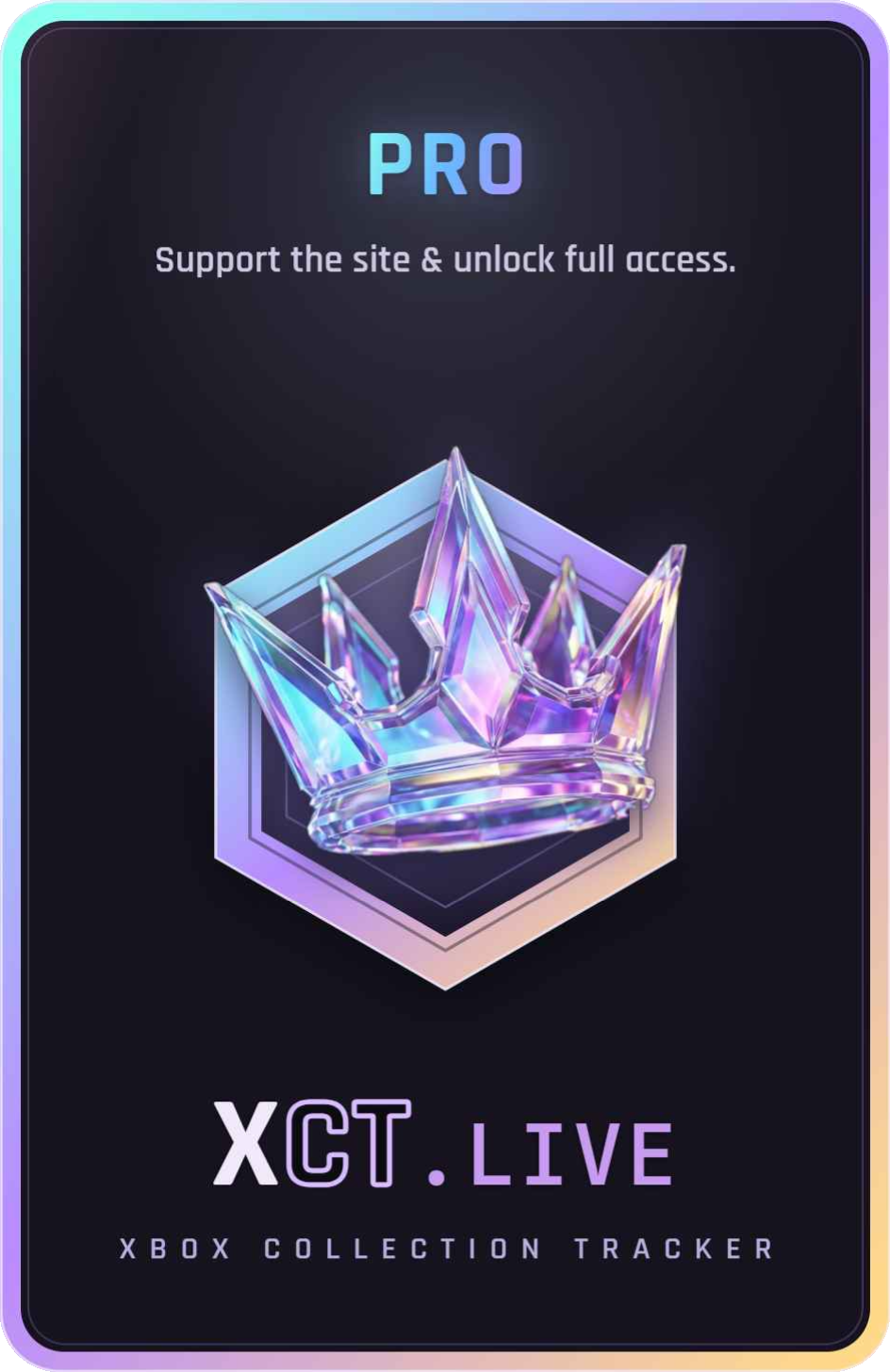
Go Pro to unlock the exclusive animated Pro Membership Deck card — plus 400 Core and a Pro role in the Discord. Pro members also earn 1.5× Core on every reward — and all the Core you’ve earned so far is topped up ×1.5 the moment you join.
Games the Store deleted. We didn’t.
Microsoft pulls titles from sale all the time — these have no Store page left at all. XCT permanently archives their art, data and achievements, and Powertools can still download & reinstall them straight from Microsoft’s CDN.
Every one of these is hard-delisted — gone from the Store. Pro + Powertools brings them back.
Powertools restores the download & install — you still need a valid license (own the game, or have it in your library / a sub) to actually play it.
Free vs Pro
Browse for free. Go Pro to unlock the rest.
Feature
Free
Pro
Full collection & entitlement tracking
—
✓
10 years of purchase history synced (vs 7 on microsoft.com)
—
✓
XCT Powertools desktop suite
—
✓
Milestones — your animated gaming-journey timeline
✓
✓
Public profile customisation
—
✓
Exclusive Pro Membership Deck card + 400 Core
—
✓
1.5× Core on every reward (+ existing Core backfilled)
—
✓
Exclusive XCT Discord role
—
✓
Already subscribed? Paste this code in your Ko-fi message to link your account
—
💬 Join the community
Hang out with other collectors, request features and report bugs — a lot of XCT started as member suggestions.

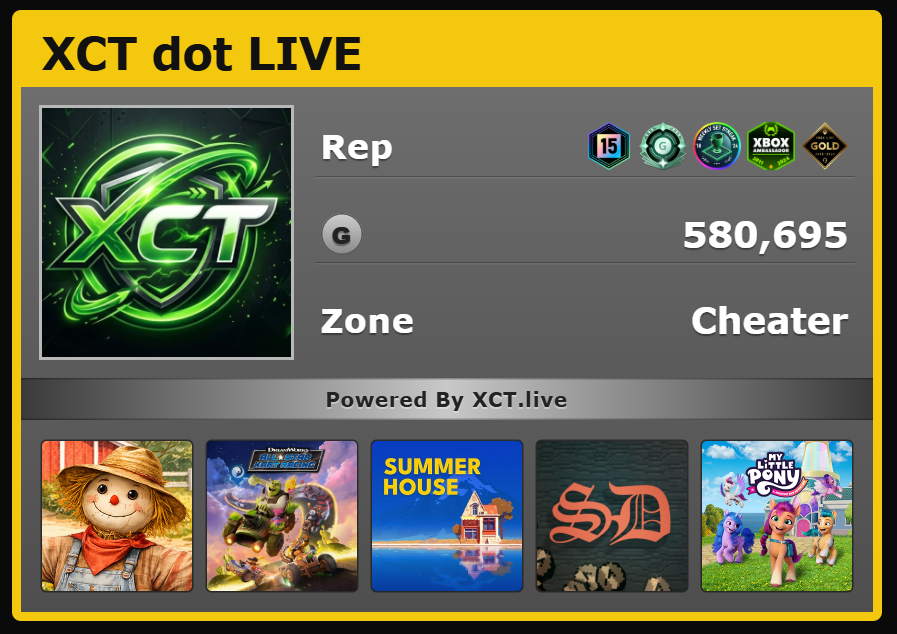 Sign in with your Xbox account and the Summary tab now leads with a retro Xbox 360 style gamercard: gamertag in the yellow stripe, your profile picture, a Rep row built from your rarest equipped badges (tenure, gamerscore tier, then up to three Initiative badges), total lifetime gamerscore, your picked Zone, and a strip of the five games you've played most recently. Pick your Zone from the dropdown below the card — Recreation, Pro, Family, Underground, or Cheater.